






Protege Vandal Resistant
Touchscreen Intercom Entry Station
(Surface Mount)
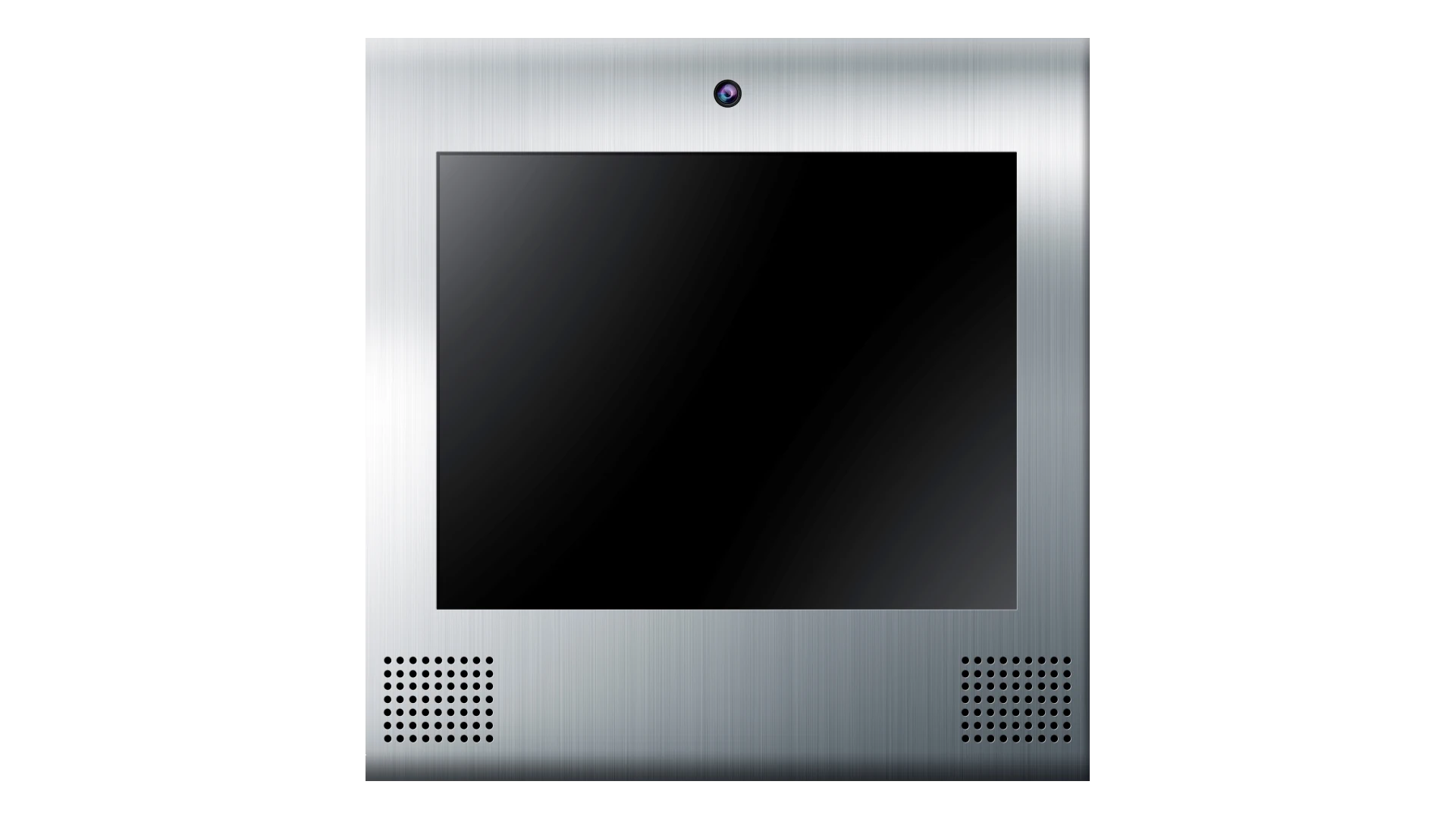
PRT-ENTR-17-SFC
Located at the main entrance, the 17” touchscreen entry station is likely to be the first thing people notice as they approach the building. Designed to operate as a standalone unit, or as part of a complete integrated Protege solution, the Entry Station provides an intuitive interface for visitors to communicate with tenants, building management, a concierge, or even to off-site locations, such as directly linking guests with corporate housing owners. VoIP and video capability, enables you to view live video from multiple sources and utilize two-way voice communication to SIP compliant phones and intercoms.
- Vandal resistant IP65 rated enclosure
- Built in high resolution camera with wide viewing angle
- Customizable home page for the display of floor plans or company specific branding
Features
Vandal Resistant Construction
A vandal resistant body and stainless steel front plate protects against malicious damage. The enclosed design accommodates both surface and flush mounting into a wall and mounting onto a kiosk stand.
Web Interface
The web interface enables you to configure and manage users displayed in the directory and adjust the entry station’s settings. The web interface also allows you to program offline lock operation.
User Integration
User integration allows you to manage entry station tenancy directory listings within Protege WX or Protege GX, avoiding the need for double-entry of user details.
Directory listings automatically synchronize and display on the entry station. Visitors can then use the directory to call tenants, who are able to unlock a door using valid credentials to conveniently grant access for their guests.
Protege Integration
The entry station can communicate with any Protege WX or Protege GX controller to control connected physical devices and monitor the status of the entry station. When integrated with Protege GX or Protege WX, you can program functions that enable you to use the Entry Station to unlock the doors leading to each apartment, trigger lighting along the way, and call the appropriate elevator. Integration is achieved by adding the Entry Station into Protege as a keypad.
VoIP Capabilities
The VoIP entry station can run as a standalone point-to-point device, or register as a phone on any VoIP capable PBX to allow normal call operation.
Using a VoIP capable PBX server enables you to use phone numbers to call devices and configure complex call routing. This enables communication to multiple stations simultaneously, routing calls to alternative stations after a defined period of time, and diverting calls to different units based on a set schedule. If the server allows, you can also dial numbers on the public telephone network using a configured extension to dial out.
Point-to-point connections involve IP to IP calling between the entry station and VoIP devices. This enables you to make calls with the entry station without using a VoIP SIP server (only supports calls to other VoIP devices).
Wide Angle Camera
The entry station provides a live video feed that is viewable from a remote monitoring station, a web browser, a Grandstream IP phone or from within Protege WX/Protege GX.
Customizable Home Page
From the web interface, you can create a unique user experience with high quality graphics for display on the entry station’s home page. This enables you to tailor the entry station to fit with your company’s branding.
Advertising Support
The entry station supports the display of advertisements on the home page.
Installation Wiring
Power is provided via a suitable 12VDC supply. Ethernet connection allows for installations that use either a dedicated Protege network or that simply connect the entry station and Protege System Controller to the building’s existing network.
Power over Ethernet (PoE)
PoE simplifies installation and reduces costs. Because PoE runs data and power together over the same cable, it eliminates the time and overhead associated with AC outlet installations, while providing flexibility of the install location.
Mounting Location
The entry station needs to be positioned so that it is not exposed to direct sunlight, to prevent the display from overheating. If this is not possible, a sun cover is required.
Android/iOS Client
Configure any Android or iOS device to operate as an entry station client, enabling tenants to interact with visitors using the entry station. The client provides full VoIP functionality, live video streaming, and Protege GX / Protege WX controller integration.
Optional Wiegand Output
Use any Protege or third party reader module to read the Wiegand output data sent from the entry station.
RS-485 (Encrypted ICT OSDP) Reader Port
Connect an RS-485 capable card reader to the entry station to grant tenants access to the building.
Local Door Control
The entry station comes equipped with one programmable open collector output suitable for local door operation.
- When operating standalone, you can use DTMF codes to toggle the onboard output, enabling you to unlock/lock a door with a phone call
- When operating in online mode, use DTMF codes to unlock a door controlled in Protege GX / Protege WX
- When the entry station is online with Protege GX or Protege WX, tap the screen to navigate to the directory and unlock a specific door
Optional Postal Lock
Complexes or buildings with mailboxes on the secure side of the installation can add the Postal Lock mechanism to allow for door release by postal service providers.
Specifications
| Ordering Information | |
| Standard Models | Surface Mount: PRT-ENTR-17-SFC / Flush Mount: PRT-ENTR-17-FMT |
| Power Supply | |
| Operating Voltage | 12VDC (9 -16VDC) |
| Operating Current | 4A |
| Power over Ethernet | PoE 802.3at Class 4 (25.5W max) For use ONLY with Injector module POE61W-560DG |
| Communication | |
| Speed | 10/100 |
| Port | 80 Web Interface, 5600 SIP, 9450 Module Comms |
| Camera | |
| Resolution | 720p (1280x720 pixels) |
| Viewing Angle | 140° horizontal / 70° vertical |
| Frame Rate | 15fps |
| Audio | |
| Out - Speakers | 2 x 8Ω, 1W RMS |
| Out - Amplifier | 1.5W, 0.1% THD |
| Out - Max Volume | 85dB at 1m |
| In - Microphone | 6mm Electret Condensing |
| In - Direction | Omnidirectional |
| In - Sensitivity | -46dB (Nominal) |
| In - Signal/Noise Ratio | >60dB |
| Inputs/Outputs | |
| Inputs - Postal Lock Input | 1 |
| Outputs - Open Collector Output | 1 |
| Environment | |
| Operating Temperature | -25° to 55°C (-13° to 131°F) |
| Working Humidity | 10%-90% |
| Environmental IP Rating | IP65 |
| Dimensions | |
| Visible - Height | Surface Mount: 438mm (17.3") / Flush Mount: 508mm (20") |
| Visible - Width | Surface Mount: 424.5mm (16.7") / Flush Mount: 498mm (19.6") |
| Visible - Depth | Surface Mount: 67.4mm (2.65") / Flush Mount: 1.5mm (0.06") |
| Bracket / Back Box - Height | Surface Mount: 353mm (13.89") / Flush Mount: 440mm (17.3") |
| Bracket / Back Box - Width | Surface Mount: 420mm (16.5") / Flush Mount: 424mm (16.7") |
| Bracket / Back Box - Depth | Surface Mount: 2mm (0.07") / Flush Mount: 74.5mm (2.9") |
Downloads
User Documentation
Firmware
Supporting Material
Certifications & Warranties
Regulatory Notices
RCM (Australian Communications and Media Authority)
This equipment carries the RCM label and complies with EMC and radio communications regulations of the Australian Communications and Media Authority (ACMA) governing the Australian and New Zealand (AS/NZS) communities.
CE - Compliance with European Union (EU)
Conforms where applicable to European Union (EU) Low Voltage Directive (LVD) 2014/35/EU, Electromagnetic Compatibility (EMC) Directive 2014/30/EU, Radio Equipment Directive (RED) 2014/53/EU and RoHS Recast (RoHS2) Directive: 2011/65/EU + Amendment Directive (EU) 2015/863.
This equipment complies with the rules, of the Official Journal of the European Union, for governing the Self Declaration of the CE Marking for the European Union as specified in the above directives.
Industry Canada
ICES-003
This is a Class A digital device that meets all requirements of the Canadian Interference-Causing Equipment Regulations.
CAN ICES-3 (A)/NMB-3(A)
Federal Communications Commission (FCC)
FCC Rules and Regulations CFR 47, Part 15, Class A.
This equipment complies with the limits for a Class A digital device, pursuant to Part 15 of the FCC rules. Operation is subject to the following two conditions: (1) This device may not cause harmful interference; (2) This device must accept any interference received, including interference that may cause undesired operation.